 Frontend
Frontend · 13 Apr 2026
Zustand and TanStack Query: The Dynamic Duo That Simplified My React State Management
How combining Zustand for client state and TanStack Query for server state eliminates Redux boilerplate and creates a cleaner, more scalable React architecture.
TL;DR: Zustand handles client state (UI, filters, preferences). TanStack Query handles server state (API data, cache, synchronization). Each solves exactly one problem — and neither interferes with the other. Together, they replace Redux + manual fetch logic with far less code and far more robustness.
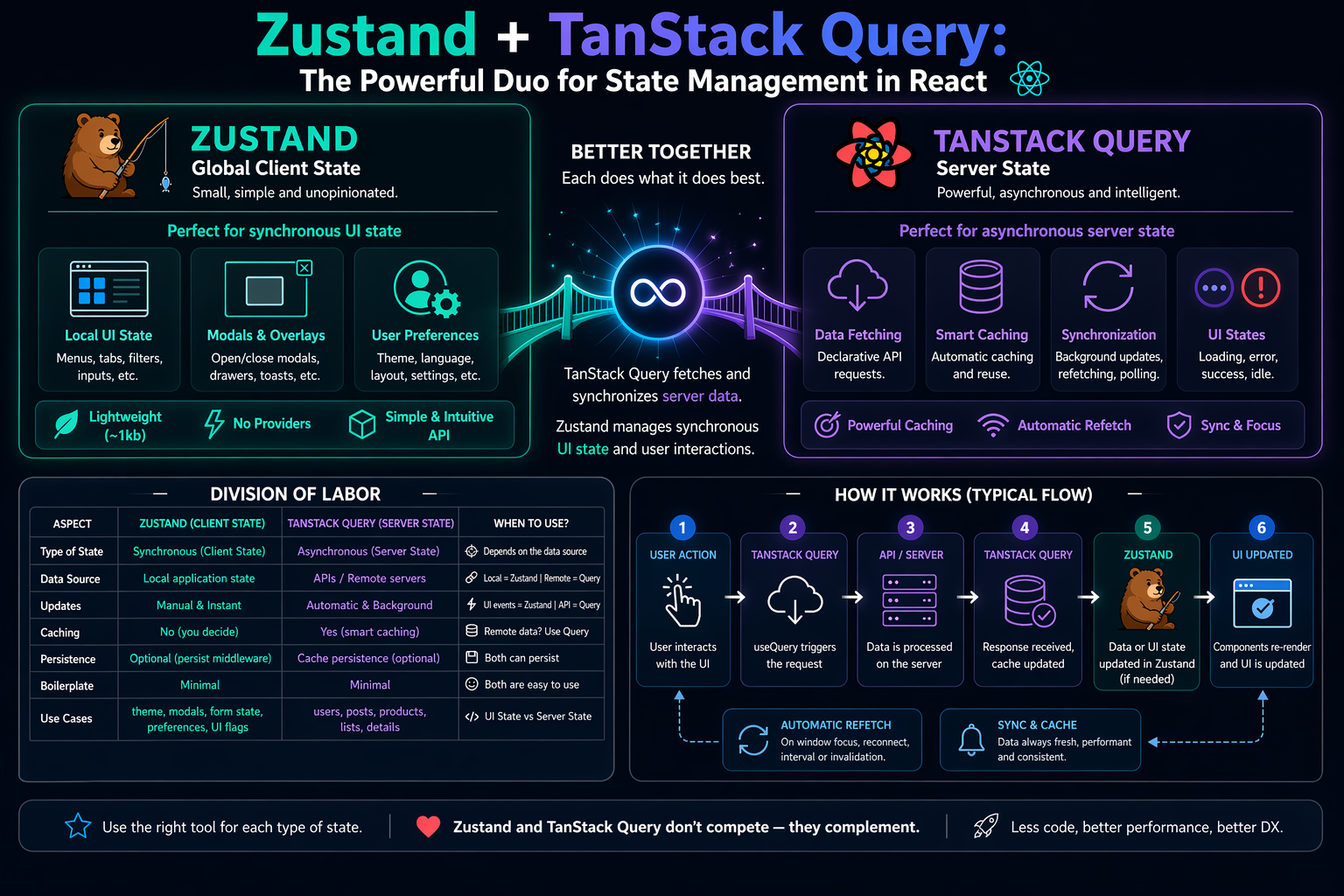
Two Types of State, Two Different Problems
The foundation of this architecture is a conceptual distinction that feels obvious once you get it, but causes a lot of unnecessary complexity when missed: server state and client state are fundamentally different problems.
Server state is any data that lives outside your application — in a database, behind an API. It can change without the user doing anything (another user edited the same record, the server updated a price). It requires async fetching, caching, revalidation, and error handling. Managing it with manual useState + useEffect is reinventing the wheel — a square one.
Client state is what lives entirely in the browser: which tab is active, which filter the user selected, whether a modal is open, the UI theme. It’s synchronous, controlled, and has no staleness. It doesn’t need cache — just reactivity.
The TanStack Query docs are explicit about this: the library doesn’t replace client-state managers like Zustand. It solves the server side. Zustand solves the client side. Using both together is the architecture — not a choice between them.
Zustand: Client State Without the Ceremony
Zustand (German for “state”) was built on a simple premise: global state management shouldn’t require Providers, reducers, action creators, or connect(). A store is a hook. That’s it.
The Minimal API
import { create } from 'zustand'

interface FilterState {
  selectedCategory: string
  sortOrder: 'asc' | 'desc' | ''
  setSelectedCategory: (category: string) => void
  setSortOrder: (order: 'asc' | 'desc' | '') => void
}

// The entire store in one hook — no Provider, no boilerplate
export const useFilterStore = create<FilterState>()((set) => ({
  selectedCategory: '',
  sortOrder: '',
  setSelectedCategory: (selectedCategory) => set({ selectedCategory }),
  setSortOrder: (sortOrder) => set({ sortOrder }),
}))

// Consuming in any component
function SortControl() {
  const sortOrder = useFilterStore((s) => s.sortOrder)
  const setSortOrder = useFilterStore((s) => s.setSortOrder)
  return <select value={sortOrder} onChange={(e) => setSortOrder(e.target.value)} />
}
Selectors: The Detail That Defines Performance
The critical point most tutorials skip: Zustand compares selector return values via strict equality (Object.is). This means three ways of consuming the store have radically different performance implications.
// ❌ Subscribes to the entire store — re-renders on any change
const state = useFilterStore()

// ❌ Creates a new object every render → infinite re-renders
const { category } = useFilterStore((s) => ({ category: s.selectedCategory }))

// ✅ Atomic selector — only re-renders when selectedCategory changes
const category = useFilterStore((s) => s.selectedCategory)

// ✅ Multiple values: use useShallow for shallow comparison
import { useShallow } from 'zustand/react/shallow'

const { category, sortOrder } = useFilterStore(
  useShallow((s) => ({
    category: s.selectedCategory,
    sortOrder: s.sortOrder,
  }))
)
Practical rule: always export custom hooks that encapsulate selectors, not the store directly. This prevents components from accidentally subscribing to the entire store.
Persist: Preferences That Survive a Reload
import { create } from 'zustand'
import { persist, createJSONStorage } from 'zustand/middleware'

export const useAppStore = create<AppState>()(
  persist(
    (set) => ({
      theme: 'light' as 'light' | 'dark',
      sidebarOpen: false,         // ← we don't want to persist this
      setTheme: (theme) => set({ theme }),
      toggleSidebar: () => set((s) => ({ sidebarOpen: !s.sidebarOpen })),
    }),
    {
      name: 'app-preferences',
      storage: createJSONStorage(() => localStorage),
      // partialize: only persist what makes sense across sessions
      partialize: (s) => ({ theme: s.theme }),
    }
  )
)
// ⚠️ In Next.js with SSR: guard access behind a hydration flag
// since localStorage doesn't exist on the server.
Slices Pattern for Separate Domains
As the app grows, split the store by domain into slices and combine them into a bound store. Middlewares always go on the combined store, never on individual slices.
// store/slices/filterSlice.ts
export const createFilterSlice = (set) => ({
  selectedCategory: '',
  sortOrder: '' as SortOrder,
  setSelectedCategory: (selectedCategory: string) => set({ selectedCategory }),
  setSortOrder: (sortOrder: SortOrder) => set({ sortOrder }),
})

// store/slices/uiSlice.ts
export const createUISlice = (set) => ({
  theme: 'light' as Theme,
  modalOpen: false,
  setTheme: (theme: Theme) => set({ theme }),
  openModal: () => set({ modalOpen: true }),
  closeModal: () => set({ modalOpen: false }),
})

// store/index.ts — middlewares here, never in the slices
export const useBoundStore = create<BoundStore>()(
  persist(
    devtools((...a) => ({
      ...createFilterSlice(...a),
      ...createUISlice(...a),
    })),
    { name: 'app-store', partialize: (s) => ({ theme: s.theme }) }
  )
)
TanStack Query: Server State Done Right
TanStack Query is an async state manager. Every query is identified by a queryKey and executed by a queryFn. Caching, revalidation, automatic retries, and loading/error states come for free.
Hierarchical Query Keys and Cascading Invalidation
The query key is the cache index. The community-recommended pattern is the query key factory: a typed hierarchical structure that enables cascading invalidation and eliminates magic strings scattered across the codebase.
// queries/productKeys.ts
export const productKeys = {
  all: ['products'] as const,
  lists: () => [...productKeys.all, 'list'] as const,
  list: (filters: ProductFilters) => [...productKeys.lists(), filters] as const,
  details: () => [...productKeys.all, 'detail'] as const,
  detail: (id: number) => [...productKeys.details(), id] as const,
}

// Hierarchical invalidation: invalidates everything starting with ['products']
queryClient.invalidateQueries({ queryKey: productKeys.all })

// Invalidates only lists (not individual details)
queryClient.invalidateQueries({ queryKey: productKeys.lists() })

// Invalidates only a specific product's detail
queryClient.invalidateQueries({ queryKey: productKeys.detail(42) })
Cache, Stale-While-Revalidate, and Automatic Sync
TanStack Query implements the stale-while-revalidate pattern: when a query is stale, the component immediately receives cached data (no loading flash) while a background request revalidates. The two central parameters are:
staleTime: time in ms before data is considered obsolete. Default:0(always stale). Set higher values for data that rarely changes.gcTime(formerlycacheTime): how long inactive cache entries stay in memory before garbage collection. Default: 5 minutes.
// Window focus refetching: when the user returns to the tab, stale data is revalidated
// Active by default — only disable globally if you have a real reason
const queryClient = new QueryClient({
  defaultOptions: {
    queries: {
      staleTime: 1000 * 60 * 2,       // data is fresh for 2 minutes
      refetchOnWindowFocus: true,      // default — keep it active
      refetchOnReconnect: true,        // revalidates on internet reconnect
    },
  },
})

// Polling: periodic refetch, conditional via function
useQuery({
  queryKey: productKeys.detail(jobId),
  queryFn: () => fetchJobStatus(jobId),
  refetchInterval: (query) => {
    // Stop polling when the job is done
    if (query.state.data?.status === 'complete') return false
    return 2_000 // every 2s while pending
  },
})
Loading States in v5: isPending, isFetching, and isLoading
v5 introduced an important distinction that broke v4 code. Understanding the three states prevents subtle bugs:
const { isPending, isFetching, isError, data, error } = useQuery({
  queryKey: productKeys.list(filters),
  queryFn: () => fetchProducts(filters),
})

// isPending: query has no cached data yet (first load)
// isFetching: queryFn is executing — includes background refetches
// isLoading: shorthand for isPending && isFetching (active first load)

// Correct v5 pattern:
if (isPending) return <Spinner />          // no data yet
if (isError) return <ErrorAlert>{error.message}</ErrorAlert>

// TypeScript now knows data is defined
return (
  <>
    {isFetching && <SubtleRefetchIndicator />}  // subtle background feedback
    <ProductGrid products={data} />
  </>
)
Mutations with Optimistic Updates and Rollback
The complete optimistic update pattern requires four disciplined steps. Skipping any one of them creates race conditions or inconsistent state.
function useUpdateProduct() {
  const queryClient = useQueryClient()

  return useMutation({
    mutationFn: (product: Partial<Product> & { id: number }) =>
      api.products.update(product),

    onMutate: async (updatedProduct) => {
      // 1) Cancel in-flight refetches to prevent race conditions
      await queryClient.cancelQueries({ queryKey: productKeys.lists() })

      // 2) Snapshot the previous state (for rollback)
      const previousProducts = queryClient.getQueryData(productKeys.list(filters))

      // 3) Optimistically update the cache
      queryClient.setQueryData(productKeys.list(filters), (old: Product[]) =>
        old.map((p) => (p.id === updatedProduct.id ? { ...p, ...updatedProduct } : p))
      )

      return { previousProducts }
    },

    onError: (_err, _vars, context) => {
      // 4a) Roll back on error
      queryClient.setQueryData(productKeys.list(filters), context?.previousProducts)
    },

    onSettled: () => {
      // 4b) Always revalidate with the server — success OR error
      // Use onSettled, not onSuccess, to guarantee resync even after rollback
      queryClient.invalidateQueries({ queryKey: productKeys.lists() })
    },
  })
}
The Duo in Practice: Real Integration
The Golden Rule
Never copy server data into Zustand.
If you’re calling setQueryData or setState(api_result) in Zustand, you’re reinventing TanStack Query’s cache — badly. Zustand stores preferences; TanStack Query stores API responses. These boundaries must not cross.
Decision Criteria: When to Use What
Use TanStack Query for:
Any data fetched via REST API or GraphQL
Lists, detail views, pagination, infinite scroll
Data that can go stale because the server can change it
Mutations (create, update, delete) with automatic invalidation
Use Zustand for:
Filters, sorting, and search params that feed into queries
Theme, language, layout preferences
Modal, sidebar, and global toast state
Shopping cart before checkout (before persisting to the server)
Navigation flags, multi-step wizard state
Quick heuristic: if another system can change the data without the user acting, it’s server state. If only the user changes it, it’s client state.
Integrated Example: Filter in Zustand, Query in TanStack
This is the canonical pattern. Zustand filters go into the queryKey — when the user changes a filter, TanStack Query automatically fires a new request or serves from cache if that combination was already fetched.
// 1) store/useFilterStore.ts — Zustand holds user preferences
export const useFilterStore = create<FilterState>()(
  persist(
    (set) => ({
      selectedCategory: '',
      sortOrder: '' as SortOrder,
      setSelectedCategory: (selectedCategory) => set({ selectedCategory }),
      setSortOrder: (sortOrder) => set({ sortOrder }),
    }),
    { name: 'product-filters' } // preferences survive page reloads
  )
)

// 2) hooks/useProducts.ts — bridge between Zustand and TanStack Query
export function useProducts() {
  // useShallow prevents re-renders when other store fields change
  const { selectedCategory, sortOrder } = useFilterStore(
    useShallow((s) => ({
      selectedCategory: s.selectedCategory,
      sortOrder: s.sortOrder,
    }))
  )

  return useQuery({
    // Filters are part of the key — cache per filter combination
    queryKey: productKeys.list({ category: selectedCategory, sort: sortOrder }),
    queryFn: () => fetchProducts({ category: selectedCategory, sort: sortOrder }),
    staleTime: 1000 * 60 * 2,
    // Keep previous data visible while new data loads
    placeholderData: (prev) => prev,
  })
}

// 3) ProductList.tsx — component consuming both libs via hooks
function ProductList() {
  const { data, isPending, isFetching, isError, error } = useProducts()
  const setCategory = useFilterStore((s) => s.setSelectedCategory)

  if (isPending) return <Spinner />
  if (isError) return <ErrorAlert>{error.message}</ErrorAlert>

  return (
    <>
      <CategorySelector onChange={setCategory} />
      {isFetching && <SubtleRefetchIndicator />}
      <ProductGrid products={data} />
    </>
  )
}
The component has no idea two libraries are involved. It just consumes hooks. That’s the right level of abstraction.
Zustand vs Redux: The Direct Comparison
In 2025–2026, Zustand overtook Redux Toolkit in weekly downloads for new projects. The migration makes sense once you adopt TanStack Query for server state — because what’s left of global state is too small to justify Redux’s overhead.
Bundle: Zustand ~1 kB gzip vs Redux Toolkit ~12–14 kB (without RTK Query)
Boilerplate: Zustand is direct hooks vs slices + actions + reducers + Provider in Redux
Learning curve: Zustand has one central concept (
create) vs actions/reducers/selectors/middleware/thunks in ReduxDevTools: both integrate with Redux DevTools via the
devtoolsmiddlewareWhen Redux still wins: large teams with strict Flux architecture mandates, legacy codebases, or when RTK Query is already in use and migration isn’t worth it
Recommended Project Structure
src/
  store/
    index.ts                # useBoundStore with all slices
    slices/
      filterSlice.ts        # UI filters
      uiSlice.ts            # theme, modals, sidebar

  queries/
    productKeys.ts          # query key factory
    useProducts.ts          # useQuery + Zustand filters
    useProductMutations.ts  # useMutation with optimistic update

  components/
    ProductList.tsx         # consumes useProducts()
    FilterPanel.tsx         # consumes useFilterStore()

  lib/
    queryClient.ts          # QueryClient with defaultOptions
Conclusion
The Zustand + TanStack Query architecture solves React’s historical state management problem with conceptual clarity: each library does exactly one thing and does it well. You replace a monolithic Redux store trying to handle everything with two specialists that don’t interfere with each other.
The practical result:
No manual fetch logic (
useEffect+useState+ loading + error + abort)Automatic cache with request deduplication
Intelligent background revalidation with zero extra code
Global UI state with a ~1 kB bundle and a 10-line API
First-class TypeScript in both libraries
The rule that doesn’t change: never copy server data into Zustand. Server state lives in TanStack Query. Client state lives in Zustand. Components only consume via hooks. That separation is the architecture.