 Frontend
Frontend · 13 Apr 2026
6 Secret useEffect Techniques
Beyond fetch and event listeners. What the docs show — and what they don't explain properly.
useEffect is the most taught hook. And the most misunderstood. Not because the API is bad — but because most tutorials stop at the second example.
Fetch on mount. Event listener. Dependency array with the right variable. That's the basics, and the basics are everywhere.
What's not everywhere are the six behaviors that separate those who use useEffect from those who understand useEffect.
6
recurring error patterns
1
future technique, available now
0
unnecessary ones with Ref as escape
Technique 01 — Cleanup with AbortController
Every time a component unmounts before a fetch completes, the response still arrives — and tries to update the state of a component that no longer exists.
React used to warn in the console: "Can't perform a React state update on an unmounted component". The warning was removed in React 18. The bug remains.
function UserProfile({ userId }) {
  const [user, setUser] = useState(null);

  useEffect(() => {
    const controller = new AbortController();

    async function fetchUser() {
      try {
        const res = await fetch(`/api/users/${userId}`, {
          signal: controller.signal,
        });
        const data = await res.json();
        setUser(data);
      } catch (err) {
        if (err.name === 'AbortError') return;
        console.error(err);
      }
    }

    fetchUser();
    return () => controller.abort();
  }, [userId]);

  return <div>{user?.name}</div>;
}
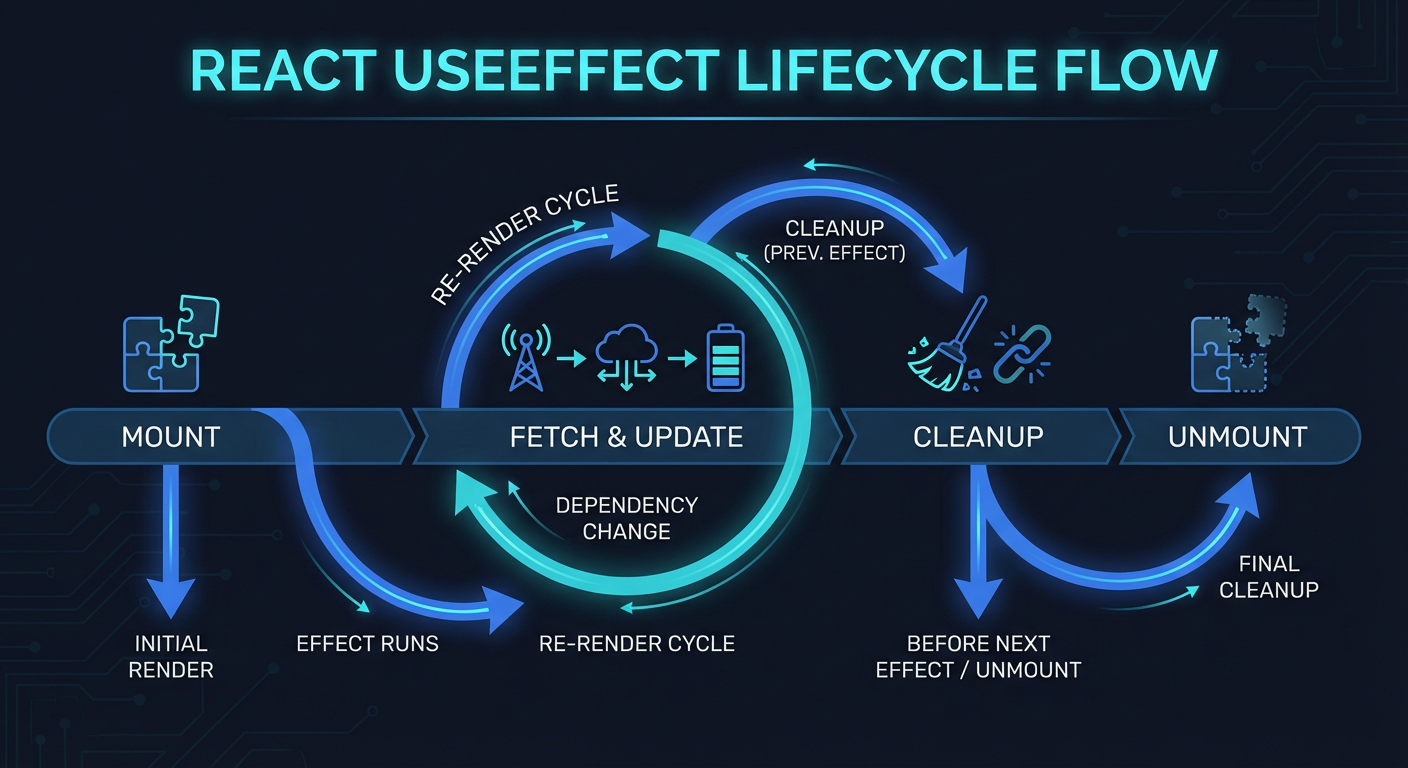
The cleanup function runs when the component unmounts and before each new effect execution — meaning before every call with a different userId.
Technique 02 — The dependency array is a declaration, not a filter
The wrong instinct shows up like this: the effect runs too often, so the dev removes a dependency from the array to "stop" the extra executions. It works until it doesn't.
The dependency array tells React which values this effect uses. Not which values should trigger the effect. That distinction changes everything. Omitting a dependency doesn't silence the re-run — it creates a stale closure: the effect gets stuck with an old snapshot of the value, and the bug surfaces non-deterministically.
❌ Stale closure
useEffect(() => {
// count is read here,
// but omitted from the array.
// The value never updates.
document.title = `Count: ${count}`;
}, []); // ← lying to React
✅ Honest declaration
useEffect(() => {
// count is in the array.
// React knows when to re-run.
document.title = `Count: ${count}`;
}, [count]); // ← honest contract
eslint-plugin-react-hooks catches omissions automatically. Disabling the exhaustive-deps rule is hiding the symptom, not treating the cause.
If the effect runs too often, the real problem is usually an object or function being recreated on every render. The fix is to stabilize the values — with useCallback, useMemo, or by moving the definition inside the effect itself. Not omitting.
Technique 03 — useLayoutEffect: when the DOM can't wait
useEffect fires after the browser paints. Most of the time, that's exactly what you want. But there's a window between React committing changes to the DOM and the browser painting the screen.
For tooltip positioning, layout measurements, and animations that depend on real dimensions — useEffect fires too late. The user sees the element in the wrong position before it corrects itself.
function Tooltip({ targetRef, children }) {
  const tooltipRef = useRef(null);
  const [pos, setPos] = useState({ top: 0, left: 0 });

  // Measures BEFORE paint — no position flash
  useLayoutEffect(() => {
    if (!targetRef.current || !tooltipRef.current) return;
    const targetRect = targetRef.current.getBoundingClientRect();
    const tooltipRect = tooltipRef.current.getBoundingClientRect();
    setPos({
      top: targetRect.top - tooltipRect.height - 8,
      left: targetRect.left + targetRect.width / 2 - tooltipRect.width / 2,
    });
  }, [targetRef]);

  return (
    <div ref={tooltipRef} style={{ position: 'fixed', top: pos.top, left: pos.left }}>
      {children}
    </div>
  );
}
useLayoutEffect is synchronous and blocks paint. Reserve it for DOM measurements and positioning. Slow operations here will freeze the UI.
Technique 04 — Refs as dependency escape hatches
Callback functions come as props. When you need to call them inside an effect, the linter requires them in the dependency array. But callbacks recreated on every render make the effect re-run for no real reason.
The ref is the way out: it stores the latest value without making the effect depend on it.
function useInterval(callback, delay) {
  // Ref always holds the latest version of the callback
  const savedCallback = useRef(callback);

  // Updates the ref without re-running the effect
  useEffect(() => {
    savedCallback.current = callback;
  }, [callback]);

  // The interval uses the ref — deps array only needs [delay]
  useEffect(() => {
    if (delay === null) return;
    const id = setInterval(() => {
      savedCallback.current(); // reads latest value via ref
    }, delay);
    return () => clearInterval(id);
  }, [delay]);
}
Technique 05 — useEffectEvent: reading state without depending on it
An effect needs to react to a change — roomId — but inside it, needs to read a current value — theme — without that value causing re-execution. React 19 introduced useEffectEvent to formalize this separation between reactive and non-reactive code.
import { experimental_useEffectEvent as useEffectEvent } from 'react';

function ChatRoom({ roomId, theme }) {
  // onConnected reads theme internally, but doesn't depend on it
  const onConnected = useEffectEvent(() => {
    showNotification(`Connected to room ${roomId}`, theme);
  });

  useEffect(() => {
    const connection = createConnection(roomId);
    connection.on('connected', () => onConnected());
    connection.connect();
    return () => connection.disconnect();
  }, [roomId]); // theme doesn't need to be here
}
Status as of April 2026: useEffectEvent is still canary/experimental. In production, use the useRef pattern from technique 04. Same concept — the API will stabilize.
Technique 06 — useEffect doesn't manage derived state
This is the most common silent mistake. The code works. Tests pass. And yet there's an extra render every time — plus a useEffect that shouldn't exist.
// ❌ Effect to derive state — causes double render
function FilteredList({ items, query }) {
  const [filtered, setFiltered] = useState([]);
  useEffect(() => {
    setFiltered(items.filter(item => item.name.includes(query)));
  }, [items, query]);
  return <List items={filtered} />;
}

// ✅ Calculated during render — correct and no overhead
function FilteredList({ items, query }) {
  const filtered = useMemo(
    () => items.filter(item => item.name.includes(query)),
    [items, query]
  );
  return <List items={filtered} />;
}
useEffect exists to synchronize React with external systems: APIs, WebSockets, timers, localStorage, third-party libraries. Not to transform data that's already inside React.
Quick test: any useEffect that starts with setSomeState(...) deserves suspicion. Ask first: could this calculation happen during render?
What changes in your code from now on
Every fetch inside useEffect has an AbortController — no exceptions.
The dependency array is honest. When it's uncomfortable, the problem is the value being recreated, not the eslint rule.
DOM measurements and positioning use useLayoutEffect, not useEffect.
Prop callbacks inside effects are stabilized via ref or useCallback.
useEffectEvent separates what reacts to the outside world from what just reads internal state.
Derived state is calculated during render. useEffect is not a data transformer.
useEffect hasn't changed much since React 16.8. What changed is the understanding of what it actually is: a synchronization layer between React and the external world.
Everything that doesn't need the external world — doesn't belong there.
Interactive quiz